Hero Section
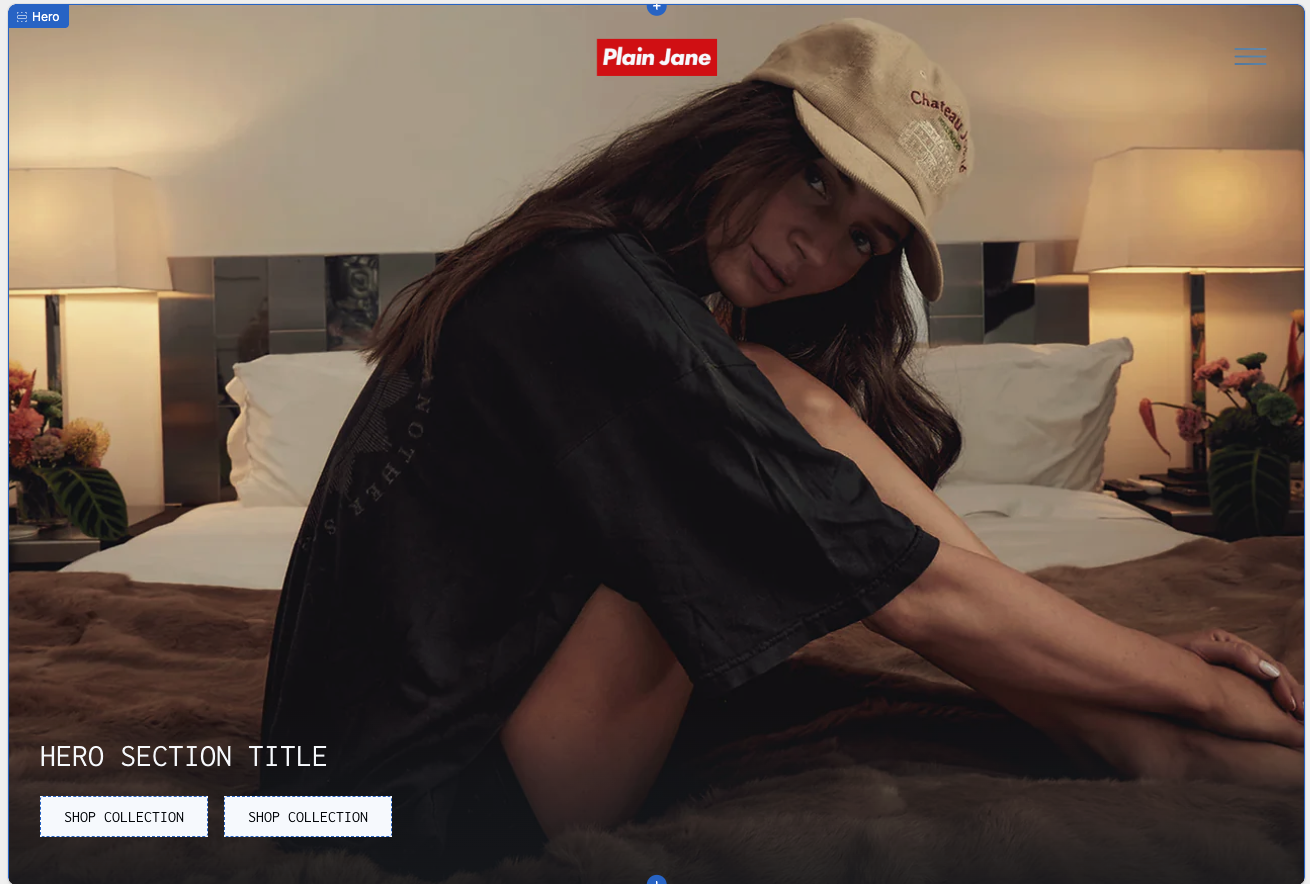
The Hero section in the Plain Jane theme is a full-width banner used to create a bold first impression on your storefront.
What You’ll Learn
- How to add and customize the Hero section
- How to switch between image and video backgrounds
- How to configure title, overlays, and spacing
- How to add and style up to 2 call-to-action buttons
🧩 Section Overview
The Hero section in the Plain Jane theme is a full-width banner used to create a bold first impression on your storefront. You can feature an image or autoplaying video with a title and up to two call-to-action buttons.
💡 Tip: For best results, use high-quality imagery or short, muted video loops under 10MB.
⚙️ How to Add and Customize the Hero Section
1. Add the Section
- From the Shopify Theme Editor, open your Home page
- Click Add Section and choose Hero
- Drag it to the top of your layout (optional)
2. Upload Background Media
Under Content & Data:
- Media Type: Choose
ImageorVideo - Image: Upload or select your First Image
- Second Image (Optional): Used for mobile fallback if enabled
- Video: Upload
.mp4format only; autoplay is muted
⚠️ Warning: On iPhones in Low Power Mode, video autoplay may be disabled.
🖋️ Text and Layout Settings
Title
- Hero Title: Add your message (e.g., “NEW ARRIVALS”)
Layout & Display
- Hero Height: Choose from
50%,75%, or100% of viewport height - Use Image Instead of Video on Mobile: Toggle ON to override mobile video
- Show only one image on mobile: Helps control layout and speed
- Mobile Image Selection: Choose which image to display
Content Position
- Set the text and buttons to:
Top LeftTop CenterCenterBottom LeftBottom Right
🎨 Typography, Colors & Styling
Typography
- Font Weight: Choose between
RegularandBold
Colors
- Title Color: Set custom hex color (e.g.,
#FFFFFF)
Overlays
- Top/Bottom Overlays: Optional gradients for readability
- Set:
- Overlay Color
- Overlay Height (%) using slider
💡 Tip: Use a semi-transparent black (
#000000at 40%) to make text stand out.
📦 Spacing
Customize spacing separately for desktop and mobile:
plaintextCopyEditTop Spacing (Desktop): 0px
Bottom Spacing (Desktop): 20px
Top Spacing (Mobile): 0px
Bottom Spacing (Mobile): 16px
🔘 Buttons
You can add up to two buttons. Each button includes:
Content & Data
- Button Text: Example:
SHOP COLLECTION - Button Link: Paste any internal or external URL
Colors
- Background Color: (e.g.,
#FFFFFF) - Text Color: (e.g.,
#000000)
Styling
- Round Corners: Adjust border radius in
px
⚠️ Button limit: You can only add 2 buttons per Hero section.
🧩 Section Tree Example
Hero
├── Button
└── Button
Need Help?
- 💬 Join our community on Discord: https://discord.gg/hcc2GvgZc6
- 📧 Email us at: support@openspaces.design
- 💻 Live chat with us: Available Monday–Friday, 10AM–6PM EST, directly on our website